First hand in DriveHUD in five minutes
Six short steps from download to a live results database. If anything doesn't match what you see, contact support with your log text.
- 1
Install DriveHUD 2 or 3 and open it
American Hand Converter feeds hands into DriveHUD 2 or 3, so DriveHUD needs to be installed and running first. Any DriveHUD 2 or 3 license works, including its trial.
Tip: The converter shows DRIVEHUD: Connected in green once it can see DriveHUD.
- 2
Download and install the converter
Grab the installer from the download page and run it. Windows may show a SmartScreen prompt for a new publisher; choose More info, then Run anyway. The app opens with a 7-day free trial already active.
- 3
Tick your sites and press Start
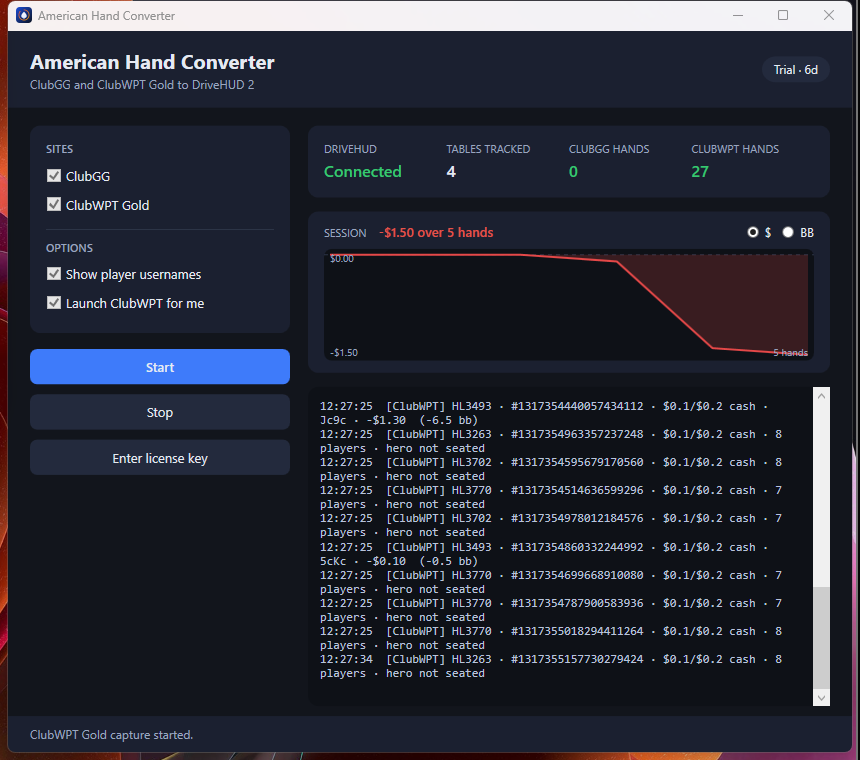
Check ClubGG and/or ClubWPT Gold in the left panel. Leave 'Launch ClubWPT for me' on if you play there: the converter starts the ClubWPT Gold client itself so it can read your hands. Press Start.
Tip: The converter runs as administrator so it can attach to the poker clients. That's expected.
- 4
Play a hand
Sit at any cash table or tournament. The TABLES TRACKED and hands counters tick up, each hand is written to the log with your result in dollars and big blinds, and the SESSION graph starts drawing. Switch the graph between $ and BB with the toggle.
- 5
Check DriveHUD
Open DriveHUD 2 or 3 and look at the hand list: your club hands appear under your real screen name within seconds, and graphs, reports and the replayer work on them like any other site.
Tip: Multi-tabling is fine. Each table is tracked separately.
- 6
Activate when the trial ends
Pick a plan on the pricing page. Your license key is shown right after checkout and emailed to you. In the converter click Enter license key, paste it, and Activate. Renewals apply automatically; you never need to paste a new key.
Troubleshooting
- The counters stay at zero
- Make sure you pressed Start before sitting down, and that the site is ticked. For ClubWPT Gold, let the converter launch the client itself (the Launch ClubWPT for me option); a client that was already open before Start isn't attached.
- DriveHUD says Not running
- Press Set up DriveHUD in the converter: it finds DriveHUD 2 and 3 on your PC, starts them, and confirms hands can be imported into each. It only imports while DriveHUD is open.
- Hands show in the converter but not in DriveHUD
- The converter reads DriveHUD's own log and tells you why. The usual reason is the DriveHUD licence: Hold'em and Omaha are licensed separately by DriveHUD, so Omaha hands are rejected until Omaha is added to your DriveHUD licence.
- Hands show 'hero not seated'
- That hand was captured from a table where you were observing rather than sitting. It's still saved to the database; it just isn't counted in your session results.
- Where are my hands kept?
- Inside DriveHUD's own database. The converter also keeps a plain-text copy of each day's hands in your Windows profile under AppData / Local / AmericanHandConverter / hands as a backup.